
Introducing the HireArt Manager Dashboard: A Refreshed HireArt, Built for Clarity
The new HireArt manager dashboard is here to give real-time visibility into every step of hiring and employment
We’ve been heads-down building something we’re genuinely excited to share.
We’ve just launched the new HireArt Manager Dashboard, a ground-up rebuild of the manager experience. This redesign gives you clarity, speed, and control across everything happening on your team.
Three big things drove this rebuild:
- Our new design system that makes the platform feel faster and more intuitive,
- Real-time onboarding visibility so you always know where every hire stands
- A global search bar that finds anyone, anywhere in the platform in seconds.
Here’s a closer look at what’s new.

A New Modern Look: HireArt's New Interface
The first thing you’ll notice is that HireArt just feels better.
We’ve rebuilt the interface with a fresh, modern design system — cleaner navigation, more consistent components, and a layout that makes everyday tasks feel smoother. Whether you’re checking in on jobs, reviewing timesheets, or pulling up worker documents, everything is right where you’d expect it.
The new sidebar organizes everything into three clear sections:
- Hiring (Jobs, Interview Calendar, Onboardings)
- Finance (Timesheets, Paid Time Off, Expenses, One-Time Payments)
- Management (Workers, Time Off Calendar, Documents, Reports).
Don’t waste any time searching for what you need. Everything is organized in our updated navigation.
Onboarding Visibility: Know Exactly Where Every Hire Stands
One of the biggest pain points we heard from managers: “I have no idea where my new hires are in the onboarding process.”
That changes today.
The new Onboardings view gives you real-time status tracking for every worker. From the moment an offer is initiated. Have a clear view of each step, including background checks, screenings, and full clearance.
At a glance, you’ll see who’s “Ready to Work,” who’s still in screenings, and how many onboarding requirements each person has completed.
No more back-and-forth emails with your HR team just to get a simple status update.
You can filter by onboarding status, job title, or start date, and download a CSV whenever you need to share a report with your leadership team. Every column is configurable, so you only see what matters to you.
Global Search: Find Anyone, Instantly With ⌘K
How much time do you spend scrolling through lists trying to find a specific worker or candidate?
With the new global search bar, that’s a thing of the past.
Hit ⌘K (or click “Search your workspace…” at the top of any page) and you can instantly find any worker, candidate, or job from a single search field — available from anywhere in the platform. Results surface immediately as you type, tagged by type (Worker, Candidate) so you always know what you’re looking at.
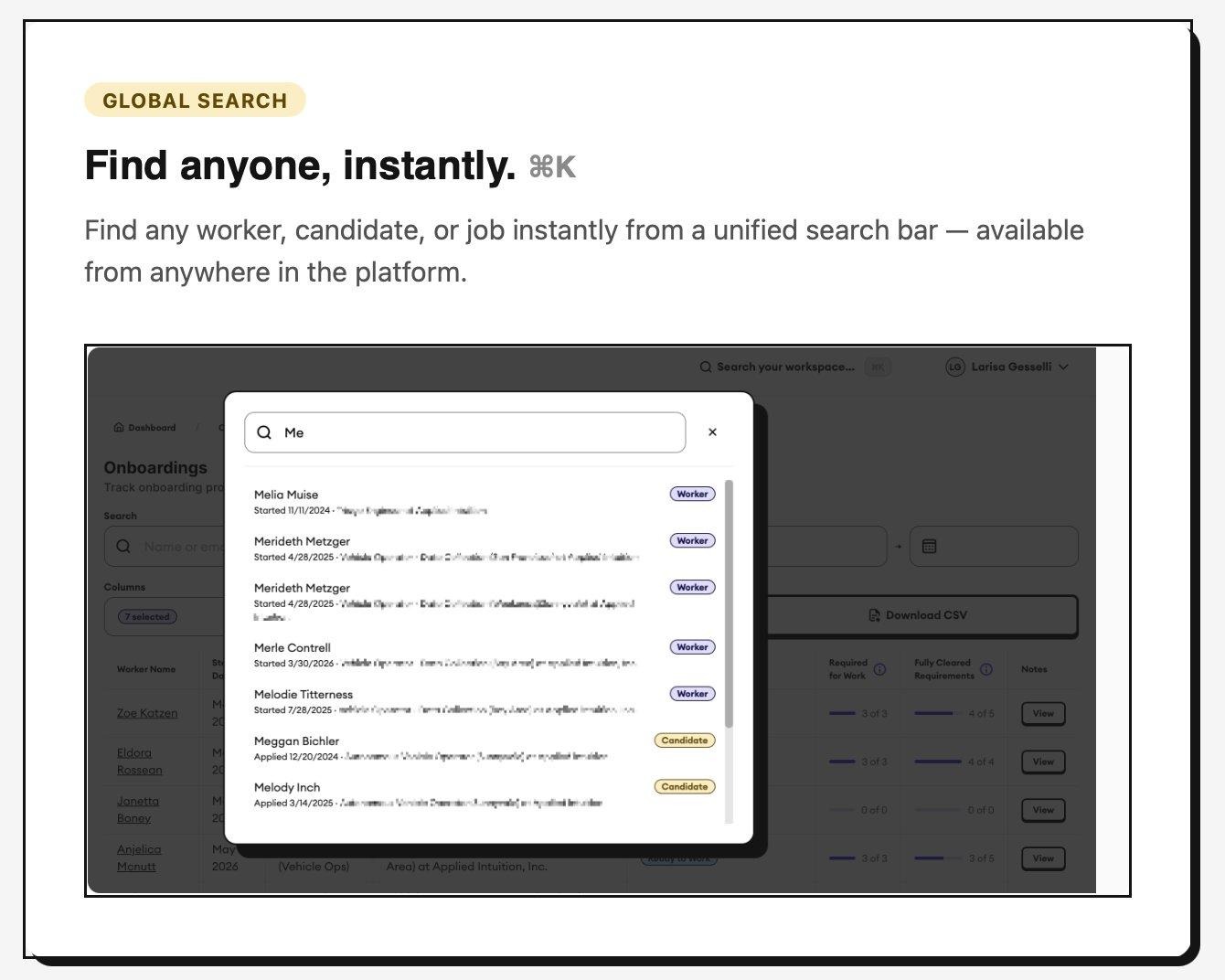
Global search (⌘K) finds any worker, candidate, or job instantly — from anywhere in the platform.
This is one of those small changes that makes a surprisingly big difference in your day-to-day. Less clicking, less scrolling, more doing.
Ready to Explore the New Dashboard?
The new Manager Dashboard is live now for all HireArt customers.
Log in today and take it for a spin. We think you’ll feel the difference immediately.
If you’re not yet a HireArt customer and want to see what the platform can do for your organization, we’d love to show you. And stay tuned for more product updates. We have lots up our sleeves here!
More Product Updates from HireArt


